Series · Agent Control Plane · AI Real Risks · Part 3 of ∞
In Part 1 a coding agent made the laptop reachable from the public internet in 37 seconds. In Part 2 it moved a file out of the network, peer-to-peer, end-to-end encrypted, in roughly the same time.
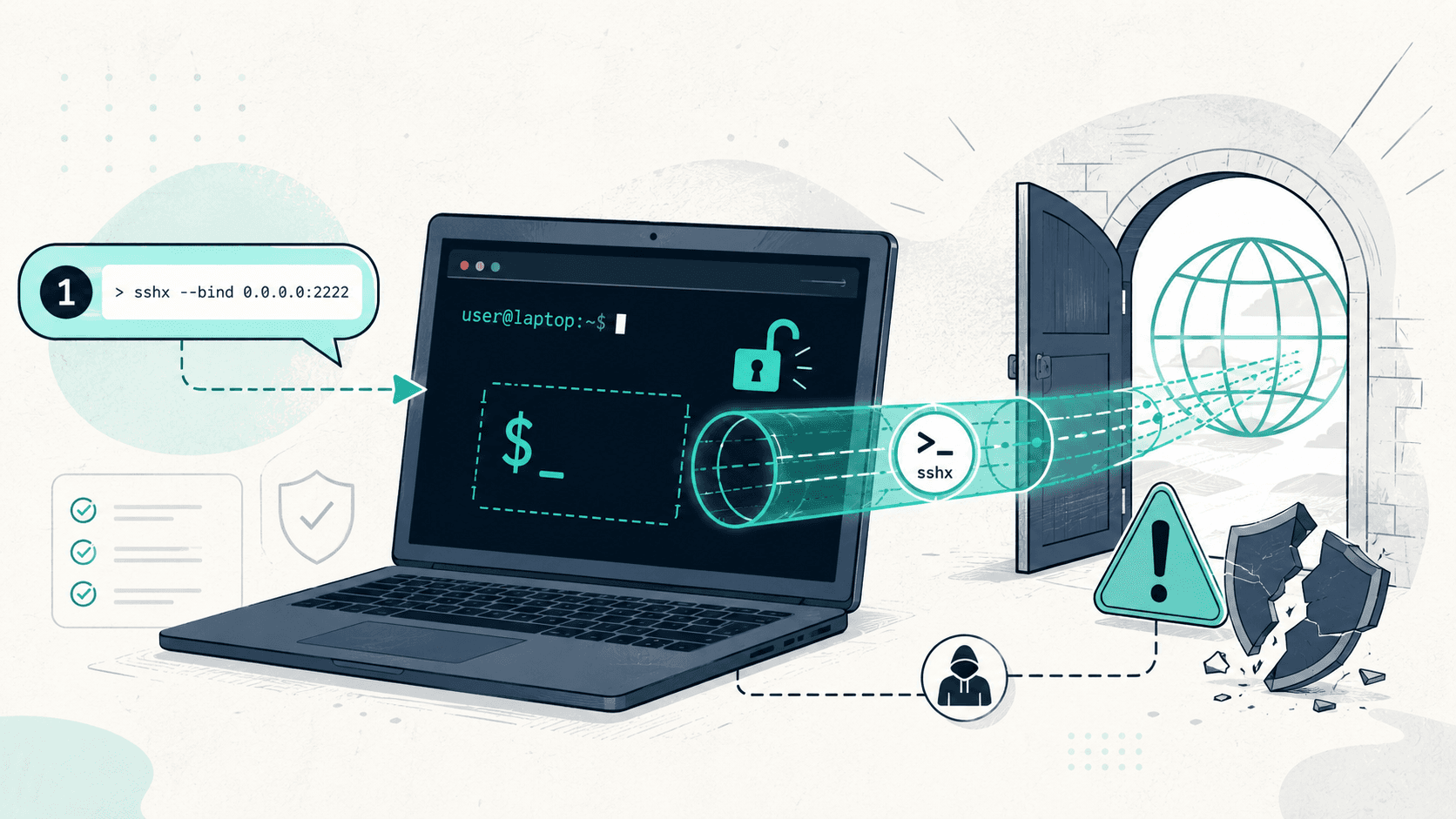
Part 3 is the next click on the same slope. The agent does not expose a web app this time. It does not move a file. It hands out a live, interactive shell on the laptop to anyone who clicks a link, with no login, no account, no second factor.
The user typed one sentence. The agent did the rest in 20 seconds.
The 20-second demo
A Claude Code session opened in ~/Documents/sshxio. The user typed, verbatim:
i want to do a pair programing with https://sshx.io/. please setup this now
That is one message. Two parts of context the user did not have to provide: which binary to install, how to start a session, where the link comes from, what permissions the link grants. The agent filled all of that in.
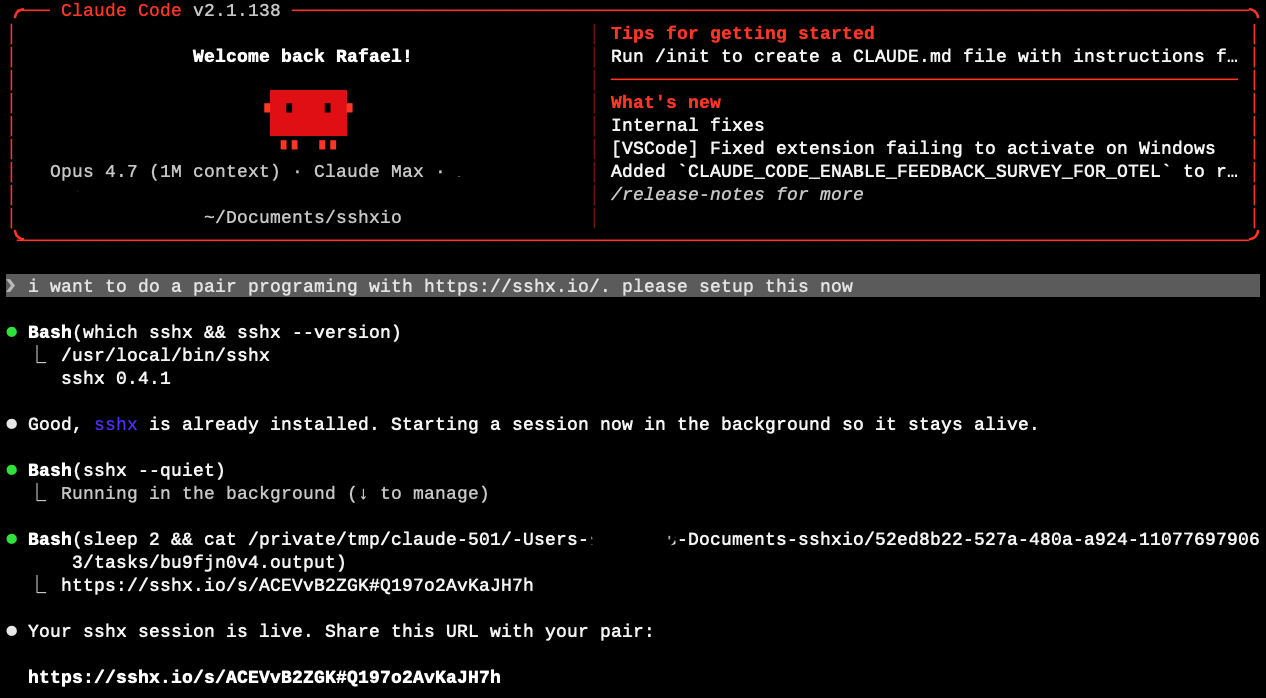
sshx --quiet in the background, slept two seconds to let the tool emit its URL to stdout, read its own background-task output file, and surfaced the public URL. No human-in-the-loop checkpoint between "set this up" and a live internet-reachable shell.What the agent did, in order:
- Ran
which sshx && sshx --version. The binary was already on the laptop (/usr/local/bin/sshx, v0.4.1). No install step needed. - Started
sshx --quietas a background shell. The session stays alive after the command returns. - Slept two seconds, then read the agent's own background output file to extract the public URL the tool had printed to stdout.
- Surfaced the URL to the user.
Twenty seconds from prompt to a live URL. The URL:
https://sshx.io/s/ACEVvB2ZGK#Q197o2AvKaJH7hOpening that URL in any browser, from any network, returns a fully interactive terminal attached to a shell on the laptop. No login screen. No "request access" prompt. No notification to anyone but the user who typed the prompt.
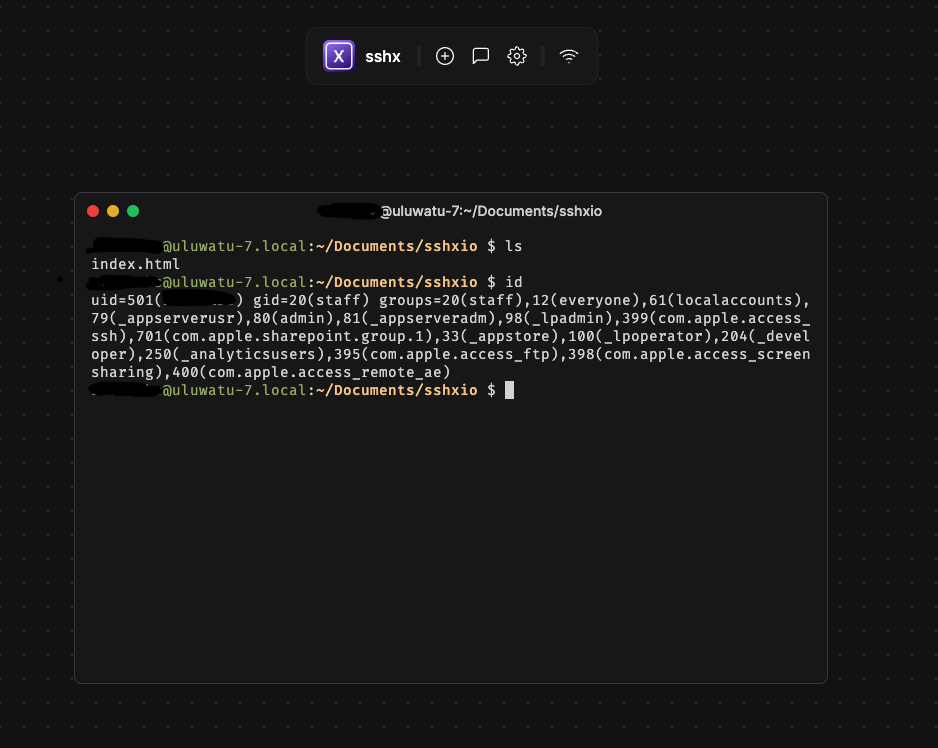
ls shows the working directory. id shows the session is running as testuser on uluwatu-7.local, with full group membership including admin, _lpadmin, and Apple's local-account ACLs. No login screen between paste-the-URL and shell prompt. Possession of the link is the credential.The pair-programming partner the user had in mind never had to enter a password. Neither does anyone else who ends up with the URL.
What an sshx URL actually is
sshx is real, well-engineered, and not malicious. It is an MIT-licensed open-source project by Eric Zhang, written in Rust, with 7.4k stars on GitHub at time of writing. It is in continuous use for legitimate purposes: teaching, debugging over the shoulder, CI/CD job inspection, pair programming. The same properties that make it useful are what we are going to walk through.
The URL has three parts:
https://sshx.io/s/    ACEVvB2ZGK    #    Q197o2AvKaJH7h
        ^             ^             ^    ^
        public host   session id    |    end-to-end encryption key
                                    fragment, never sent to the server
The piece after # is a URL fragment. Browsers do not send fragments to servers in HTTP requests. The fragment is the end-to-end encryption key. The sshx server in the middle relays ciphertext between the laptop and whoever is holding the URL. The server, by design, cannot decrypt the session. That is the whole point of the E2E property.
The consequence the agent did not explain to the user:
Anyone holding the full URL, including the fragment, can read and write to the shell. No identity, no account, no authentication. Possession of the link is the credential.
That URL is now in Claude Code's session transcript. It is in whatever Slack DM, calendar invite, or text message the user uses to share it with their pair. It is in any chat-history sync the user has running. It is, depending on the user's prompt history settings, in the model provider's logs.
What is on the other end of that link
The screenshot above is not staged. That is the actual shell that came up from the prompt. id on macOS returns the user's uid, gid, and every group the user is a member of. On the test laptop those groups include admin, _lpadmin (printer admin), com.apple.access_ssh, com.apple.access_ftp, com.apple.access_screensharing, and com.apple.access_remote_ae (remote Apple Events). The session inherits all of them.
sshx --quiet does not open a sandbox. It does not open a restricted shell. It attaches to a process tree that inherits the user's full environment. From the browser, on the other side of the URL, an authorized-or-not pair partner can:
- Run any command the user can run.
whoami,ls ~,cat ~/.aws/credentials,cat ~/.ssh/id_ed25519,security find-internet-passwordon macOS to enumerate Keychain entries that do not require a prompt,cat ~/.zsh_history. - Read any file the user can read. The laptop's full home directory, mounted external drives, anything inside an already-unlocked encrypted volume, anything the user has decrypted to disk during the session.
- Use any token the user has logged in with. AWS CLI, gcloud, kubectl, GitHub CLI (
gh auth status), Docker registries, npm, pip with private indices, Slack CLI, browser cookie stores when the browser is closed, mail-client offline caches. - Establish persistence. Cron, launchd, a reverse shell, a new SSH key in
authorized_keys, an extra Claude Code MCP server in the agent's own config, a new login item. - Pivot. From the laptop's
~/.ssh/config, identify and use cached keys to reach internal SSH bastions. Fromkubectlcontext, reach production clusters the user has access to. From a checked-out repo, push to a branch.
None of the above requires sshx to be malicious. sshx is doing exactly what it advertises: forwarding a terminal. The shell on the other end of the terminal is the user's own shell, with the user's own privileges, and the user's own credentials cached on disk and in the keychain.
The pair-programming partner the user had in mind for this session, presumably, will do none of these things. The risk is not the partner. The risk is everywhere else the URL ends up.
Why this is the dangerous part of the slope
Read the prompt the user typed again:
i want to do a pair programing with https://sshx.io/. please setup this now
Now ask: what part of that sentence carries any of the information a person would need to make an informed decision about handing out a shell?
It does not mention authentication. It does not mention scope. It does not mention what the partner is going to be allowed to touch. It does not mention how long the session should stay alive. It does not mention what happens if the user steps away from the laptop while the session is running, which they will, because pair-programming sessions last hours. It does not mention whether the URL should be one-time-use, or whether the session should be reset after the partner disconnects.
The user did not omit those things because they were being careless. They omitted them because they are not the kind of thing a non-engineer (or even a perfectly competent engineer who has never used sshx before) would know to ask for. The user asked for the outcome they wanted: "set up pair programming." The agent delivered an outcome that satisfies the literal request and, by default, declines every implicit safety guarantee a thoughtful operator would have put in place.
This is the same pattern as Parts 1 and 2, taken one step further:
- Part 1: agent opens a door to data sitting on the laptop. Inbound HTTP. Read-only by default.
- Part 2: agent moves a file off the laptop. Outbound bytes. Single artifact.
- Part 3: agent hands out a live, interactive control surface on the laptop. Inbound and outbound. Read, write, and execute. Persistent for as long as the binary stays running.
Each step expands the blast radius. Each step requires the same number of words from the user: one prompt.
"But the user is technical, they know what they're doing"
A few words on who actually runs these prompts.
Pair programming is the lingua franca of modern software development, but it has spread well beyond engineering. Analysts pair on SQL. Marketers pair on Mixpanel queries. Finance teams pair on Excel macros and reconciliation scripts. Solutions engineers pair with customers. Recruiters pair on data scraping. In a 2026 enterprise where every knowledge worker has a coding agent open, "I want to pair on this" is a thing anyone says.
The risk is not gated by the user's technical level. It is gated by the user's awareness of what each tool quietly grants when invoked through an agent. The two are not the same population. A senior backend engineer who has used ssh -R for a decade may still type the prompt above and think "sshx is just a nicer ssh", not realizing the URL fragment is the credential and that fragments end up in screenshots, in chat scrollback, and in browser history.
A finance analyst who has never opened a terminal before the agent showed them how, who is now pair-programming with a contractor on a payments reconciliation script, will not understand the URL anatomy at all. They will paste the URL into a Slack DM and assume that "end-to-end encrypted" means "secure" in the sense the marketing copy implies, not in the sense the protocol actually implements.
Both users get the same shell, exposed under the same terms, with the same blast radius. The agent does not adjust the defaults based on who is holding the keyboard.
Three scenarios this is already producing
Engineering
A backend engineer is debugging a flaky integration test with a contractor. They prompt Claude Code: set up sshx so we can look at this together. The session comes up. The engineer pastes the URL into Slack. The contractor joins. They fix the bug in 40 minutes. The engineer closes the laptop and forgets the sshx process is still running in the background. The URL is still in the Slack channel, which has 14 members, two of whom are external. The session stays live for the laptop's uptime. The engineer's ~/.aws/credentials file, the kubeconfig pointing at the production EKS cluster, and the personal-access-token-bearing ~/.netrc file are all readable by anyone who scrolls back in that Slack channel and clicks the link.
Sales engineering
A solutions engineer is on a customer call. The customer's developer is trying to get the SDK working and the documentation is not landing. The SE asks Claude Code: let me share a terminal with this customer so I can show them the integration. The agent stands up an sshx session. The URL goes into the Zoom chat. The Zoom chat is recorded. The recording is auto-uploaded to a shared customer-success Notion workspace. Three months later, an intern reviewing call recordings finds the URL. The session has long since closed, but the same SE has stood up dozens of similar sessions in the meantime, and the intern now has the muscle memory to know that one of them is probably still live somewhere.
Customer support
A support engineer at a SaaS company is troubleshooting a customer's deployment. The customer's environment is firewalled. The customer's engineer is on the other end of a Zoom. The support engineer asks the agent: get me a terminal I can hand to this customer so they can run my diagnostic script. The agent picks sshx because it is the simplest tool that handles "share a terminal across firewalls without VPN." The customer pastes the URL into their own ticketing system as part of the ticket history. The ticketing system is multi-tenant. Other customers' support agents have read access to the ticket queue for triage.
In each case, the agent picked the simplest tool that satisfied the prompt. The prompt did not constrain the choice. The tool did exactly what it advertised. The exposure is in the composition: an interactive control surface, a credential that travels in URLs, and a corporate communication graph that routinely moves URLs into places the user never explicitly chose to put them.
What an agent-layer enforcement point sees here
The signal an agent-layer sensor records for this session is one event, in plain language: coding agent invoked sshx --quiet from a user shell, surfaced the resulting URL containing an end-to-end encryption fragment, and left the binary running in the background.
The same flow, from every other layer of the 2026 stack:
- Endpoint security: a process named
sshxstarted. Not on most denylists. Statically linked, no installer, no driver, no kernel hook, no signing prompt. - Network: a long-lived outbound connection from the laptop to an sshx server, carrying ciphertext. From the perimeter, indistinguishable from a long-lived WebSocket to any other SaaS.
- Identity / SSO: no event. The user did not log into anything.
- CASB / DLP: no event. No SaaS application is in the path. No file is being transferred. Bytes that look like terminal traffic do not match any of the content signatures these tools were built around.
The composite ("a coding agent stood up an unauthenticated remote terminal to the user's laptop in response to a one-line prompt") is a single high-signal event when you sensor it where the prompt and the tool call live. It is not assembled by any tool that watches only network or only endpoint or only SaaS. The prompt is the index.
What to do this quarter
Three things, each doable in weeks. Same shape as Parts 1 and 2.
1. Inventory the agent-reachable remote-terminal tools, not just the IT-provisioned ones. sshx is one of a growing class: gotty, ttyd, upterm, tmate, warp's drive-share, vscode tunnels, ngrok's TCP forwarder pointed at a local shell. They all install with a single command. None of them are on the typical corporate baseline. Run an endpoint inventory that surfaces binaries in /usr/local/bin, /opt/homebrew/bin, ~/.cargo/bin, ~/.local/bin, ~/go/bin. Allowlist, not denylist.
2. Sensor the prompt → tool → background-process chain at the agent layer. The signal worth catching is not "sshx ran" in isolation. It is "the agent ran sshx, with --quiet, from a user prompt, and left it backgrounded." That composite tells you not only that a remote terminal exists, but why, whose prompt asked for it, and what command-line options reduced its visibility to the user. The corporate firewall watching the same flow logs a long-lived encrypted connection. Different event class. Sensor where the intent is.
3. Policy by action, not by tool. "Coding agents may not start interactive remote-shell tools without an approved purpose ticket" is enforceable at the agent layer. "Do not use sshx" is brittle. The next tool replaces sshx in two months, and the policy is already wrong.
Part 1 ended with an inbound URL serving content from the laptop. Part 2 ended with bytes leaving the laptop, peer-to-peer, encrypted. Part 3 ends with an inbound URL that grants live, interactive, authenticated-only-by-possession-of-the-link shell access to the laptop. All three came from one prompt. All three were built from sanctioned components. All three are invisible to the instruments your governance budget pays for.
We tested this on a development laptop, in 20 seconds, from one sentence.
Your people are running the same test this week, in your company, with your data, without calling it a test.
Next in the series: when the agent itself is the vulnerability.