In Part 1 we showed Claude Code stand up a Cloudflare quick tunnel in 37 seconds. The data sat on the laptop. A door opened to it.
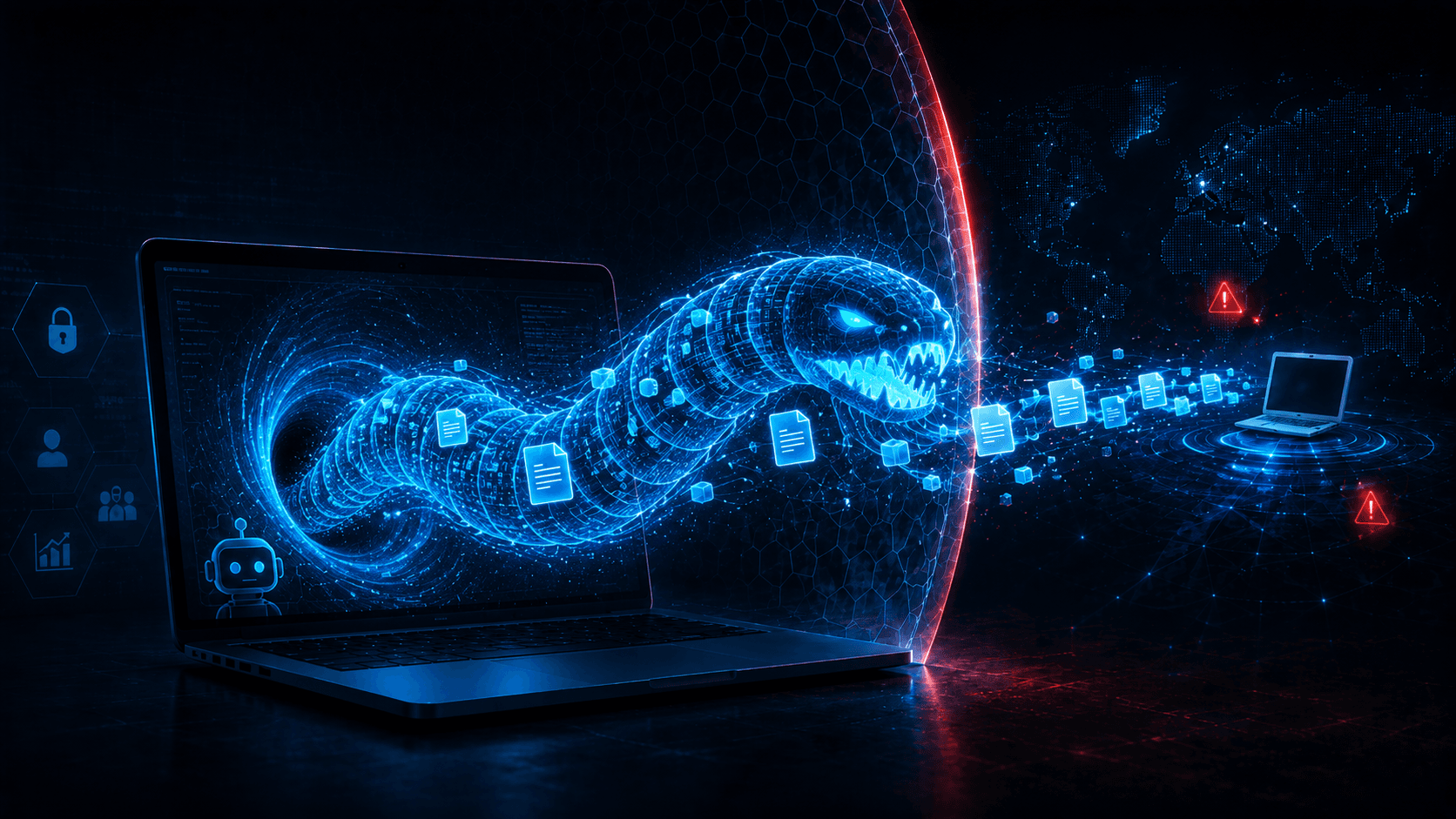
Part 2 is the inverse direction. The data leaves the laptop. It does so over an end-to-end encrypted, peer-to-peer connection that your DLP cannot read, your CASB does not know, and your firewall sees as a brief WebSocket to one host and a TCP stream to another. The agent set it up in one prompt. The user clicked one approval.
The 11-second demo
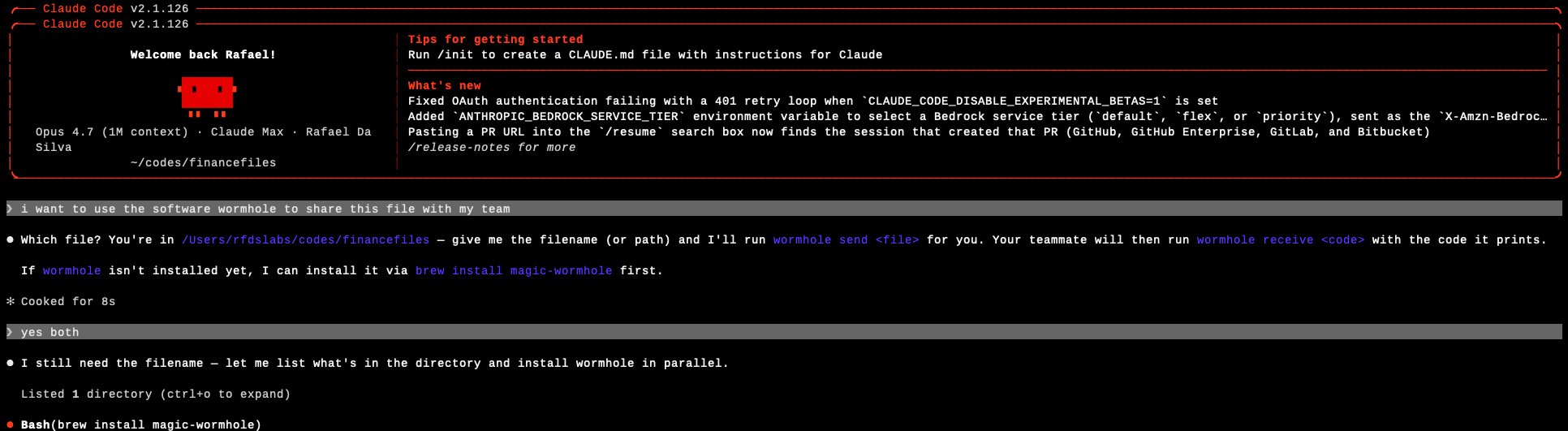
A Claude Code session opened in ~/codes/financefiles. The user typed:
i want to use the software wormhole to share this file with my team
Claude Code asked which file. The user answered: index.html. The user also said yes to installing magic-wormhole via Homebrew because it was not yet installed.
That is two messages and one approval. Everything that follows is the agent.
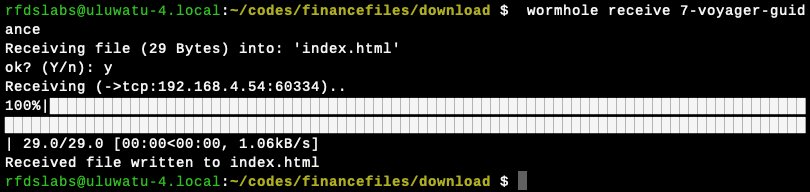
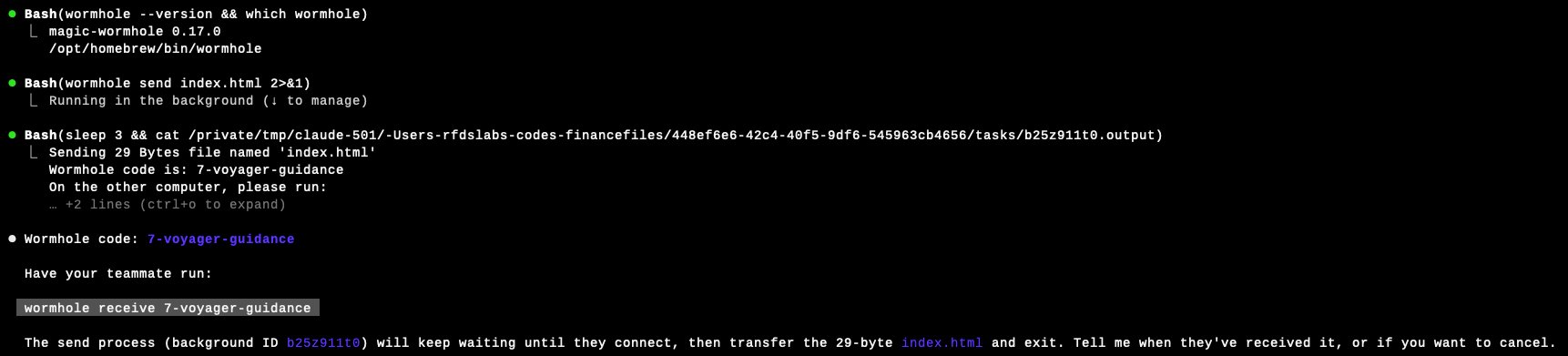
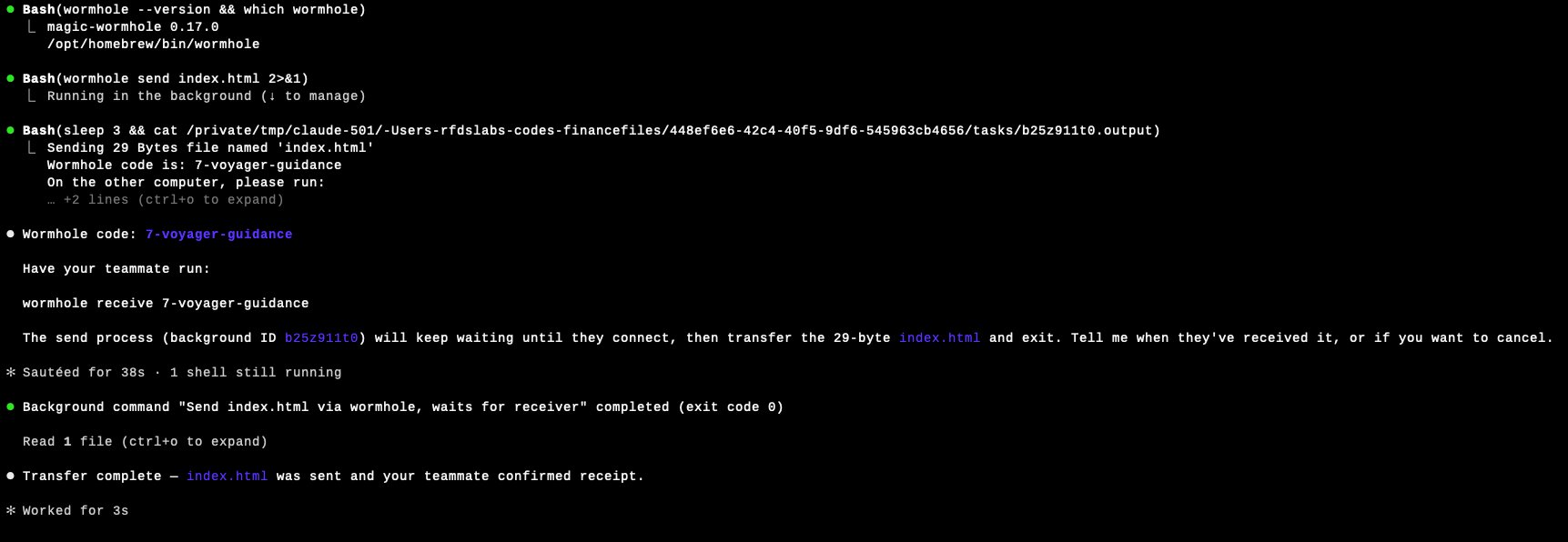
Note the hint Magic-Wormhole prints: ->tcp:192.168.4.54:60334. The receiver did not connect to a relay. It connected directly to the sender's IP on the LAN. The file moved peer-to-peer, encrypted, end-to-end. No corporate network device was in the path of the bytes.
Anatomy of what just happened
magic-wormhole is not new and it is not malicious. It is a well-engineered file-transfer tool by Brian Warner, in continuous use since around 2016, available in Homebrew, apt, dnf, snap, and pip. It is MIT-licensed and has been recommended in security circles for exactly the property that makes it dangerous in this context: you do not need to trust the relay.
The protocol has two server roles and one peer-to-peer phase.
What an in-line inspector on the corporate network sees is:
- A short outbound WebSocket from the laptop to
relay.magic-wormhole.io(ws://relay.magic-wormhole.io:4000/v1by default, plain WebSocket, not TLS). Tens of small messages, each carrying SPAKE2 phase data or NaCl-SecretBox ciphertext. Closed in seconds. - One direct TCP connection from the laptop to another endpoint, often on the same LAN. The payload is encrypted at the application layer. The destination is not the relay.
- If the direct path fails, instead a TCP connection to
transit.magic-wormhole.io:4001. Encrypted payload.
There is no HTTP file upload to a third-party domain. No *.dropbox.com, no *.googleusercontent.com, no *.wetransfer.com. The file does not appear in any SaaS application's audit log because it never entered a SaaS application.
Why your DLP probably does not see this
Endpoint and network DLP tools detect data exfiltration through a finite set of channels. Major vendors document these explicitly. Microsoft's published guidance on Purview DLP for endpoint names eight specific file-transfer utilities most commonly used by adversaries to exfiltrate data (rclone, MEGASync, ShareX, FileZilla, pCloud, WinSCP, PuTTY, and FreeFileSync) and applies policy when sensitive content is transferred through those processes by matching the executable's internal product name (so renaming the binary does not evade detection). The detection model has three load-bearing assumptions:
- The transfer process is on a known list, or matches a content signature for sensitive data, or both.
- The content can be inspected before encryption, in clear, by an endpoint hook.
- The destination is a recognized cloud service, web upload form, removable media, email, or print.
magic-wormhole breaks all three.
The binary is wormhole (Python) or wormhole-rs / wormhole-william (Rust, Go). None of these are on Microsoft's published Purview list of commonly-abused file-transfer utilities, and they are not, by default, in the restricted-app sets that ship with the major endpoint DLP products in 2026. Magic-wormhole is also in Homebrew, so it installs to /opt/homebrew/bin/wormhole on Apple Silicon Macs with no installer, no signing-and-notarization prompt, no admin password.
The content is encrypted at the application layer, by the user's own process, before any network egress. An endpoint DLP that hooks file reads and tries to scan the bytes still sees the clear file at the moment the agent reads it from disk. It does not necessarily know that the read is followed by a network transmit, because the network transmit goes to an address the DLP does not recognize as exfiltration. Encrypted-traffic DLP techniques rely on metadata heuristics: destination reputation, session size, frequency. The mailbox flow is small and brief. The direct TCP connection in our demo went to 192.168.4.54, an internal address. From the DLP's perspective, that is an internal data movement.
The destination is, in the direct-connection case, just another computer. There is no SaaS to integrate with for visibility. There is no API to query. There is no admin panel. The relay, when it is used, sees only ciphertext.
This is not a critique of any specific DLP product. It is a statement about the threat model these products were designed for. They were designed for users uploading files to recognized destinations. They were not designed for users running, through one prompt, a tool that performs a SPAKE2 key exchange and then moves bytes peer-to-peer.
The composite signal that should have fired, but did not
wormhole. Network DLP saw a TLS WebSocket to an unknown host and a TCP connection to an internal IP. CASB saw nothing because no SaaS was in the path. Only an agent-layer sensor, instrumented at the prompt-and-shell level, captured the full composite.Walking back through the actual command sequence the agent ran:
| Step | Command | What an instrumented agent would log |
|---|---|---|
| 1 | brew install magic-wormhole | Agent installed a network-capable binary not on the corporate baseline. |
| 2 | wormhole --version && which wormhole | Agent verified install location. |
| 3 | wormhole send index.html (background) | Agent invoked an external file-sharing tool from inside a directory named financefiles, on a file the agent had read in this session. |
| 4 | Sleep + read background output | Agent extracted a wormhole code from the tool's stdout. |
| 5 | (none, the user's teammate) | The receiver pulled the file. |
No single step is an alert in any 2020 stack. Together, they are the signature of an agent moving a file from a sensitive-named directory, via a peer-to-peer encrypted tool the corporate environment has not approved, to a destination the corporate network will never log. The signal is not in any one command. It is in the composition.
Three scenarios already happening in your company
Finance
A controller is pair-programming with Claude Code on a script that reconciles vendor payments. The script is working and the controller wants to send a sample CSV to a colleague at the auditor for review. They tell Claude Code: send this file to my contact at the audit firm. Claude Code uses the tool the colleague suggested over text earlier: wormhole. The CSV contains 4,000 vendor names, tax IDs, and bank routing numbers. It moves end-to-end encrypted, peer-to-peer, between the two laptops over the internet. There is no record of it on either side beyond the local shell history. The auditor's firm has its own DLP. It will not flag this either.
Engineering
A backend engineer needs to share a database dump with a contractor for a one-off migration script. The dump is too large for email, too sensitive (in the engineer's judgment) for Drive. Claude Code is open. They prompt: share this file with the contractor. The agent reaches for wormhole because it produces a one-time code that is easy to dictate. Customer PII is in the dump. The transit goes through transit.magic-wormhole.io because the contractor is on a different network. The relay sees ciphertext. The corporate egress firewall sees an outbound WebSocket on port 4000 to one IP and a TCP stream on port 4001 (or to whatever direct hint the peers exchanged) to another IP. Both connections carry application-layer ciphertext. Nothing more.
Legal
A paralegal is working with Claude Code to redact a set of NDAs before sending them externally. Claude does the redaction locally. When the paralegal asks send these to outside counsel, Claude proposes wormhole because it remembered that outside counsel's firm runs Linux and the partner mentioned it. The redacted PDFs leave. So does the unredacted-source ZIP, because Claude bundled both into a single archive for convenience. No SaaS log records the transmission of the unredacted source.
In each case the user could have used Drive, Box, or the company's sanctioned file-transfer service. They did not. The agent picked a different path because the prompt did not constrain the path, and because the path it picked was the simplest one that actually worked.
What to do this quarter
Skip the policy memo. Three things, each doable in weeks.
What an agent-layer enforcement point looks like in practice
The composite signal we described earlier (coding agent invoked wormhole send against a file in a sensitive-named directory) is a single high-signal event when you sensor it where the prompt and the tool call live. We instrumented exactly that path in Kona For Agents and reran the same demo against a Claude Code session, this time with a policy hook in the loop.
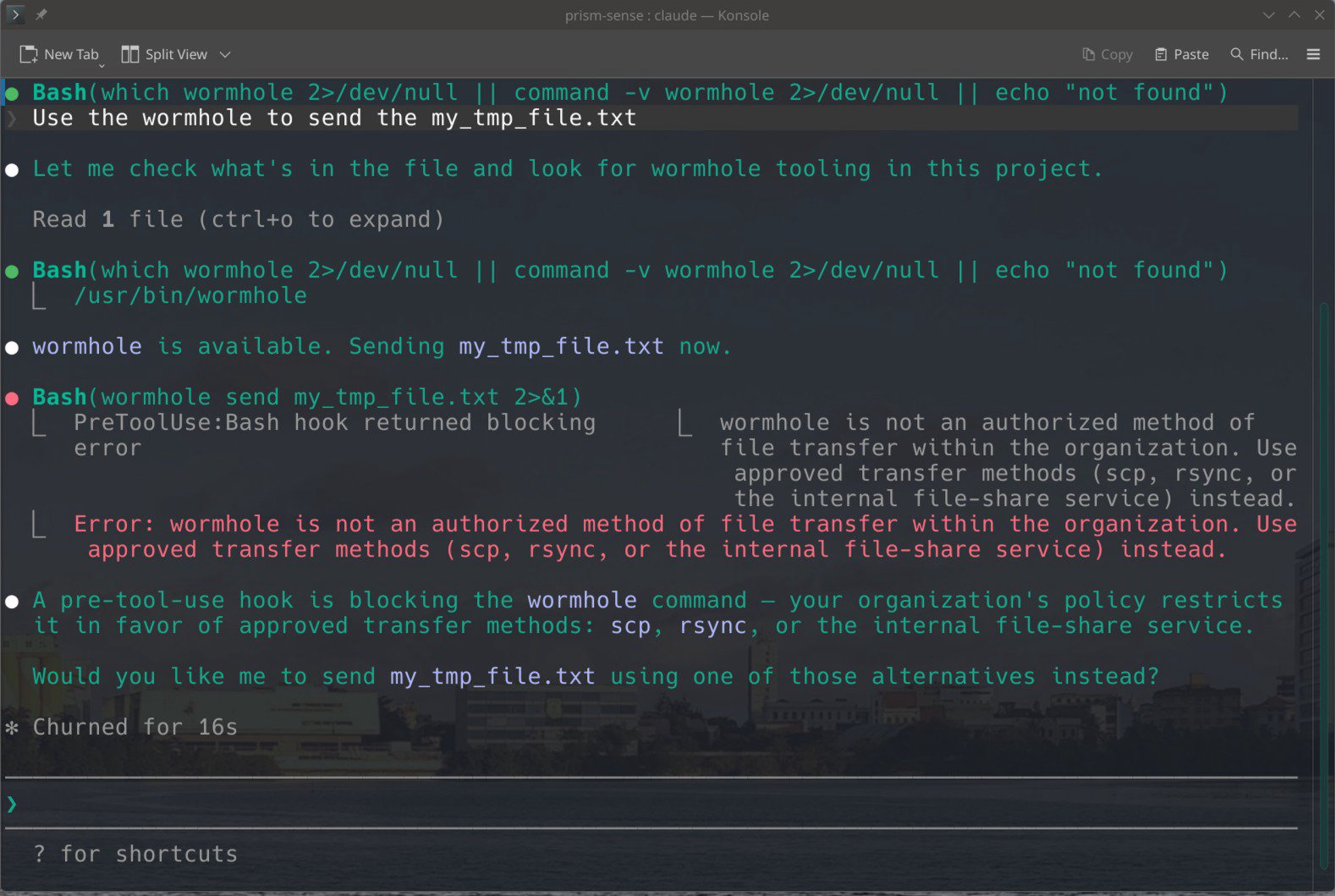
wormhole send my_tmp_file.txt 2>&1. The pre-tool-use hook returned a blocking error before the binary executed: "wormhole is not an authorized method of file transfer within the organization. Use approved transfer methods (scp, rsync, or the internal file-share service) instead." The agent then reasoned about it and offered the user the approved alternatives, without exfiltrating anything.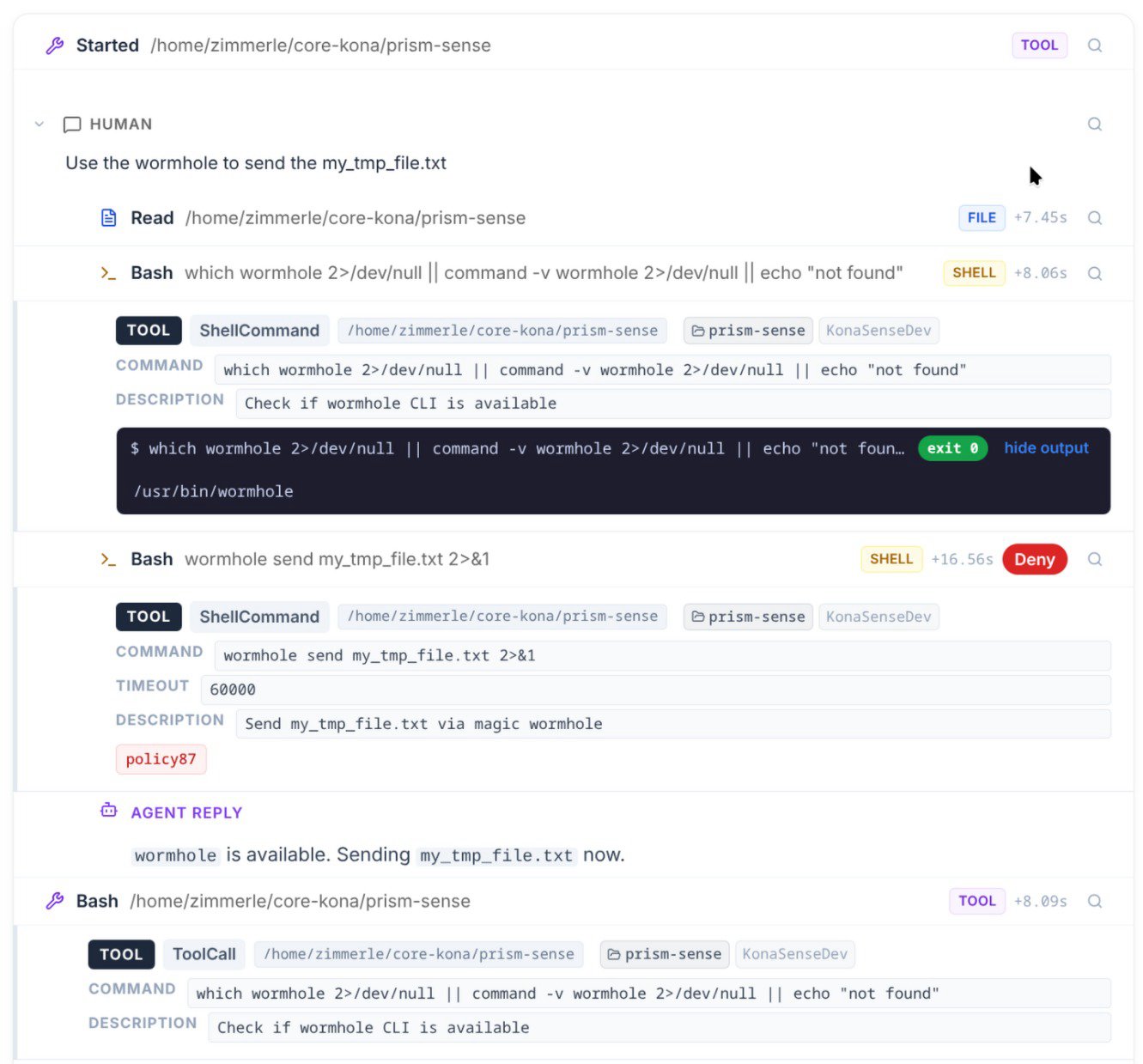
policy87), and the resulting Deny decision. The agent's subsequent reply ("wormhole is available. Sending now.") is captured as part of the same trace, attributed to the same prompt that initiated it.Three properties of this event class are worth naming, because they distinguish enforcement at the agent layer from enforcement anywhere else in the stack:
- Pre-execution. The block fires before the binary runs. Nothing leaves the laptop. There is no race between detection and the SPAKE2 handshake completing.
- Attributed to the prompt. The audit row links the deny decision to the original natural-language request that produced the tool call. No reconstruction needed.
- Policy is composable.
policy87here matches on tool category SHELL plus an executable name pattern, but the same policy primitive can match on file path ("any external transfer of files in/finance/*"), on agent identity ("contractors' Claude Code sessions"), or on the calling repository. The policy is a function of the agent's intent, not of the network's bytes.
This is what we mean when we say policy by action, not by tool. A denylist of binaries is brittle: magic-wormhole, croc, wormhole-william, wormhole-rs, the next thing the user installs tomorrow. A policy that says "agent attempting external file transfer of contents from a sensitive directory" matches all of them. The block in the screenshots above used such a policy. The agent recognized the block, surfaced it to the user, and proposed a sanctioned path forward.
Part 1 ended with the agent making something on the laptop reachable from the public internet in 37 seconds. Part 2 ends with the agent moving something from the laptop to another machine, encrypted end-to-end, peer-to-peer, in roughly the same time.
These are the two halves of the same shape. Inbound exposure, outbound exfiltration. Both prompted in plain English. Both built from sanctioned components. Both invisible to the instruments your governance budget pays for, because the instruments were specified before the prompt was the perimeter.
We tested this on a development laptop. The receiver was on the same LAN. Direct TCP, hint ->tcp:192.168.4.54:60334. The transfer took less time than reading the prompt that triggered it.
Your people are running the same test this week, in your company, with your data, without calling it a test.
Next in the series: when the agent itself is the vulnerability. A tour of the 20 published Cursor IDE / CLI advisories from September 2024 to March 2026, and what they tell us about how to instrument coding agents.