Classify
Every prompt is analyzed in real time for PII, secrets, source code, financial data, prompt injection patterns, and regulated content, before it leaves the user's device.

Kona for Browser gives security, governance, and compliance teams visibility and control over human AI use across ChatGPT, Claude, Gemini, Copilot, and 50+ GenAI tools.
KonaSense classifies every prompt in real time as it leaves the browser, detecting sensitive data, prompt injection, and risky intent before it reaches the model. Instead of blocking employees from using AI, KonaSense redacts what matters and coaches users toward safer behavior, so security keeps visibility and productivity keeps moving.
Every prompt is analyzed in real time for PII, secrets, source code, financial data, prompt injection patterns, and regulated content, before it leaves the user's device.
Sensitive content is automatically redacted or anonymized inline, so employees can keep using AI tools while the data that shouldn't leave, doesn't.
Users see contextual nudges and safer alternatives the moment risky behavior is detected. Security posture improves without interrupting flow.

 Chrome and Edge browser extensions
 Key Capabilities
Three capability pillars built for browser-based GenAI use, delivered through one unified control plane.
Complete visibility into GenAI use, context, and risk.
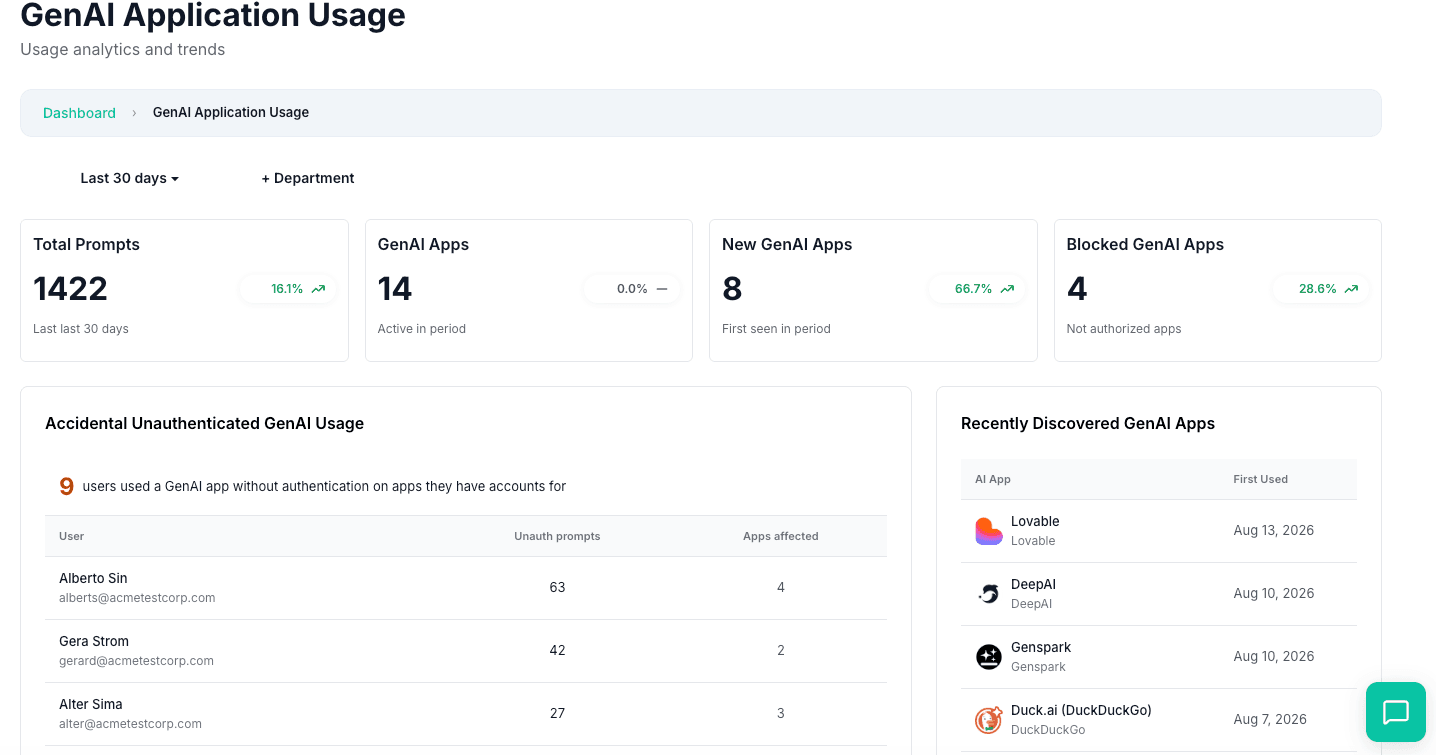
See how security, governance, and compliance teams use Kona for Browser across real-world GenAI scenarios.
KonaSense maps the browser-based GenAI tools in use, from popular chatbots to embedded AI in SaaS. See who is using them, how often, and where risk is concentrated.
100% DiscoveryDetect and stop PII, credentials, source code, and regulated data before they reach external AI tools. Policy controls act at the prompt layer, where traditional tools miss context.
Real-time ProtectionIdentify malicious instructions embedded in webpages, files, and retrieved context before they manipulate user workflows or override safety guardrails.
AI-Native DefenseKeep replayable evidence, policy logs, and usage reporting for audit, incident response, and governance teams that need to prove how browser AI is controlled.
Audit ReadyLive inventory of GenAI apps, extensions, devices, browsers, and operating systems, plus tool-level risk assessments with clear recommendations like allow, review required, or blocked. You can quantify adoption, identify unauthorized usage, and enforce policy by group.
Real-time policy enforcement on prompt, upload, and browser events. Actions include block, redact, anonymize, and coach, so sensitive data does not leave the device without control.
Incidents include a session timeline, actions taken, rationale, and optional screenshots. Analysts can reconstruct what happened in minutes, not hours, and reduce back-and-forth with users.
Policy compliance tracking, violation categories, evidence trails, and exportable records. Show what policy existed, when it fired, what it detected, and what action was applied.
Adoption and usage by team, app, and user, plus trend signals and risky prompt categories by policy. Track control effectiveness, which policies are firing, where risk is concentrated, and whether controls are reducing incidents over time.
A managed Chrome and Edge extension classifies every prompt locally, redacts sensitive tokens in real time and records evidence for the security team, without proxies or agents.
No. Classification happens inline in milliseconds and coaching nudges appear only on risky behavior, so people keep working in the AI tools they already use.
Inspection runs on the device and only policy decisions and redacted evidence leave the browser. Secrets are replaced before anything is sent to the model or to KonaSense.
 ChatGPT
 Claude
 Gemini
 Copilot
 Perplexity