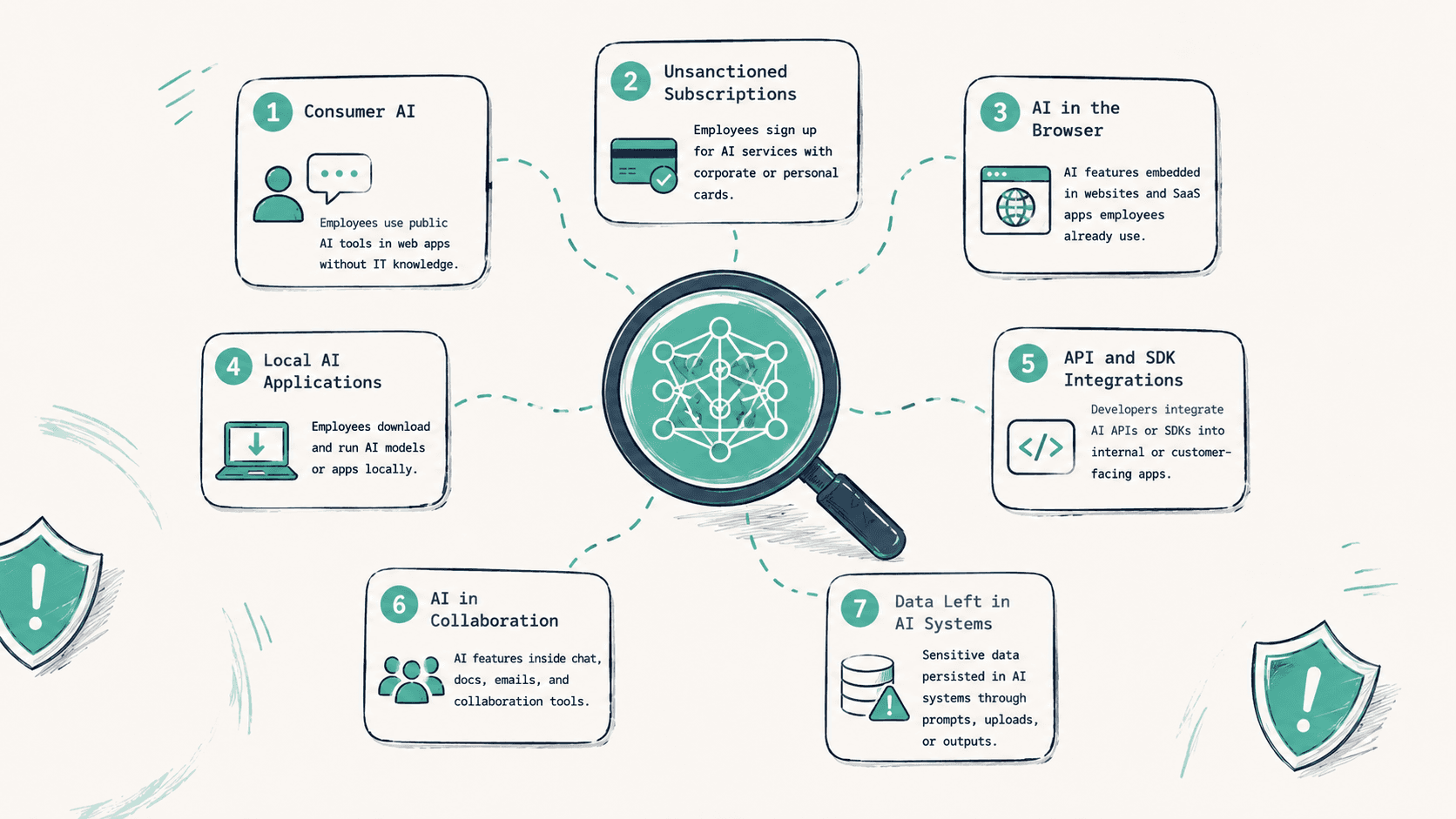
A few months ago we wrote about why Shadow AI is nothing like Shadow IT. The reaction was the same on every call afterward. "OK, we get it, but what exactly are we supposed to be looking for?" Fair question. Shadow AI is not one problem. The current Kona policy model breaks it into seven categories (six incident classes plus one informational telemetry layer), and most security teams cannot see all of those signals inside a single interaction model with the tools they already own.
This post is the taxonomy. Every Shadow AI incident in the current Kona policy model falls into one of six incident classes, with a seventh category that contains the access and authentication telemetry feeding everything else. We will walk through each one, show what it looks like in the dashboard, and explain why most legacy DLP, CASB, and proxy stacks were not designed to classify them together.
The taxonomy
Below is an anonymized 30-day snapshot from a Kona internal test tenant. The exact numbers will vary by environment. The categories are the policy model we use today.
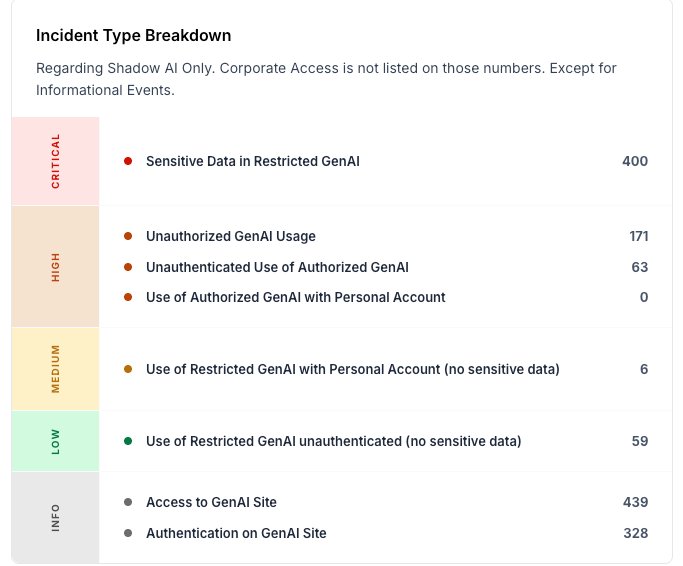
Seven categories total: six incident classes across three severity tiers, plus a seventh informational category containing the access and authentication telemetry that feeds the rest. Each incident class is a distinct combination of three signals: which app, which identity, and what was sent. Miss any one of those three signals, or look at them in isolated dashboards, and you cannot tell these classes apart. This is the core reason most legacy DLP deployments flatten them. We will come back to that.
1 · Sensitive Data in Restricted GenAI
Severity: Critical. An employee is logged into a GenAI tool the organization has explicitly restricted, and the prompt or attachment contains sensitive data. Source code, customer PII, financial figures, internal strategy, credentials, regulated content. This is the headline incident type, the one every executive imagines when they hear "Shadow AI."
It is also the one DLP comes closest to catching, because the underlying signal (sensitive content leaving the perimeter) is what DLP was designed to see. Most modern DLP, CASB, and SASE suites now market GenAI-specific content inspection for exactly this case. Where most legacy DLP rules still struggle is in correlating the sensitive-content signal with the app-policy state (authorized, restricted, unauthorized) and the identity state (corporate SSO, personal account, unauthenticated) in a single incident. Without that correlation, the same fire either becomes noise or gets scoped down until it stops mattering.
2 · Unauthorized GenAI Usage
Severity: High. An employee is using a GenAI tool the organization has not authorized at all. Not restricted, not approved. The tool is simply outside the policy boundary. Look at the dashboard above and you will see examples in the unauthorized tier. Neither was sanctioned, both are in use, and the security team is finding out from telemetry rather than from a procurement ticket.
This is often one of the fastest-growing categories because it is the category procurement and security have the least visibility into. A new GenAI tool launches every week. Employees adopt them faster than security can review them. By the time an SSO integration request lands, hundreds of sessions have already happened.
Cloud-app discovery exists in mature CASB and SASE consoles, so the visibility gap is narrowing. The remaining gap is that most DLP rules do not natively model GenAI authorization state (authorized, restricted, unauthorized) as a first-class field in the incident itself. The incident is the use, not the data sent, and that is a category many DLP policy engines do not have a clean way to express.
3 · Unauthenticated Use of Authorized GenAI
Severity: High. An employee is using a tool the organization did authorize, but is not signed in with the corporate identity. They opened the chat tool in an incognito tab, or used the free tier without logging in, or accessed the assistant on a personal device. The tool is approved. The session is not governed.
This matters because authorization without authentication is not authorization at all. The seat license, the audit trail, the SSO-enforced data residency, the enterprise retention controls. None of those apply to an unauthenticated session. The employee is on the right tool, in the wrong way, and you have no record of what they did.
Classic network DLP and proxy logs often lack reliable browser-session identity context, especially the distinction between corporate SSO, personal account, and unauthenticated sessions on the same domain. Newer browser DLP and endpoint suites have started to expose this signal, but it is rarely modeled as part of a Shadow AI incident taxonomy out of the box.
4 · Use of Authorized GenAI with Personal Account
Severity: High. The tool is approved, the user is authenticated, but the account is personal. A gmail.com or hotmail.com or proton.me identity, not the corporate one. Common pattern: an employee already had a personal account on the GenAI tool, kept using it on the work laptop, and never connected the corporate SSO when IT rolled out the enterprise tier.
The data leaves the corporate identity perimeter. Prompts get stored under a personal account the company has zero administrative access to. If that employee is terminated, the chat history walks out the door with them. If they get phished six months later, every prompt they pasted is in the breach.
At the network layer, corporate SSO traffic and personal account traffic to the same destination look identical. Some endpoint and browser-aware tools can now read this distinction from session state, but it depends heavily on the deployment surface and the specific tool. Most DLP policy engines were not designed to treat "personal account on authorized tool" as a distinct incident class.
5 · Use of Restricted GenAI with Personal Account (no sensitive data)
Severity: Medium. Same as above, but on a tool the org has explicitly restricted, and no sensitive data was detected in the session. The severity drops because the realized risk is lower, but the signal still matters. It tells you which employees, which teams, and which tools are being touched in violation of policy. It is the leading indicator that a future Critical incident is one prompt away.
A team flagged here is a team to talk to. Not to discipline, in most cases. To understand. They are using a restricted tool for a reason. Either the reason is legitimate and your authorized stack has a gap, or the reason is convenience and your policy needs reinforcement. Both are findings.
6 · Use of Restricted GenAI unauthenticated (no sensitive data)
Severity: Low. The tool is restricted, the session is unauthenticated, and nothing sensitive was detected. The lowest-risk incident the platform fires on, but it is still the start of a curve. People who use restricted tools casually today are the ones who paste a customer list into them next quarter. Tracking this without alerting on it is the right balance: visibility without noise.
7 · Access and Authentication on GenAI Sites
Severity: Informational. Two related signals, not strictly incidents, grouped as the seventh category. Access to GenAI Site is every visit to a known GenAI domain. Authentication on GenAI Site is every confirmed sign-in to one. These are the raw substrate the platform uses to compute everything above. They are not alerts. They are the inventory.
And the inventory itself is something many organizations still do not have in a usable form. Ask your CISO right now how many GenAI tools have been touched by employees this month, with which identity, on which device. If they can answer in under a minute, they have something like Kona running. If they cannot, they are flying blind on the substrate that the rest of AI governance is built on.
The pattern: three signals, not one
Every type above is a distinct combination of three signals.
- App context. Is this GenAI tool authorized, restricted, or unauthorized in our policy?
- Identity context. Is the user authenticated, and if so, with the corporate identity or a personal one?
- Data context. Did sensitive content leave the perimeter in this session?
The six incident classes are the truth table of those three signals. App-restricted + corporate-SSO + sensitive-data = Critical. App-unauthorized + any-identity + no-data = High. App-authorized + personal-account + no-data = High. And so on.
Once you see it as a truth table, the question stops being "which tool catches this" and becomes "where does my current stack already see each column, and where is the gap." We will come back to that question at the end.
Where most DLP deployments still fall short
To be fair to the category: DLP is not standing still. The leading DLP, CASB, and SASE vendors have all added GenAI-specific features in the last two years: prompt inspection, app discovery, sanctioned and unsanctioned app status, browser DLP, and identity-aware controls. Anyone telling you DLP has nothing to say about Shadow AI in 2026 is wrong.
The gap is narrower than it used to be, but it is also more specific. Four structural patterns explain why most legacy DLP deployments still miss or flatten the categories above.
One. The taxonomy itself. Most DLP policy engines were optimized for "sensitive content leaving the perimeter." The Shadow AI incident classes are not all about content. Some are about app policy state. Some are about identity state. Some are about navigation. Even modern DLP suites that have added each of these signals tend to expose them in separate consoles or as bolt-on features, rather than as a single incident model with a shared severity tier.
Two. Identity-state context at the browser session level. Distinguishing corporate SSO from a personal account from an unauthenticated session on the same destination is now technically possible with browser-aware tools, but it is still inconsistently deployed. In most environments, identity-state context lives in the IdP logs, not in the DLP incident.
Three. Non-egress events. "Access to GenAI Site" is a navigation event. "Authentication on GenAI Site" is a sign-in event. Many DLP rules will never fire on these because there is no inspectable content. These are the leading indicators of Shadow AI, and they live more naturally in proxy, browser, or IdP telemetry than in the DLP incident queue.
Four. The control surface. Most legacy DLP deployments were built around proxy, mail gateway, and endpoint file-and-clipboard agents. AI tools increasingly run inside browsers, IDE extensions, CLI agents, MCP servers, and agent runtimes. Browser DLP has shipped. IDE, CLI, MCP, and agent-runtime enforcement as first-class control points is still early everywhere. This is the part of the surface that is moving fastest and where the existing investment is thinnest.
None of this is a slight against DLP. It is a working tool for the data-leakage problem, and the category has done real work to extend it. Shadow AI is broader than data leakage. Catching it well requires app context, identity context, and data context inside a single interaction model. That is the part most teams still need to assemble, whether they build it on top of their existing DLP or pick a tool that was designed for it from the start.
What this looks like in production
All screenshots below are from the same Kona internal test tenant. The user names and team labels are test data, not customer data. When the three signals come together, the picture sharpens fast:
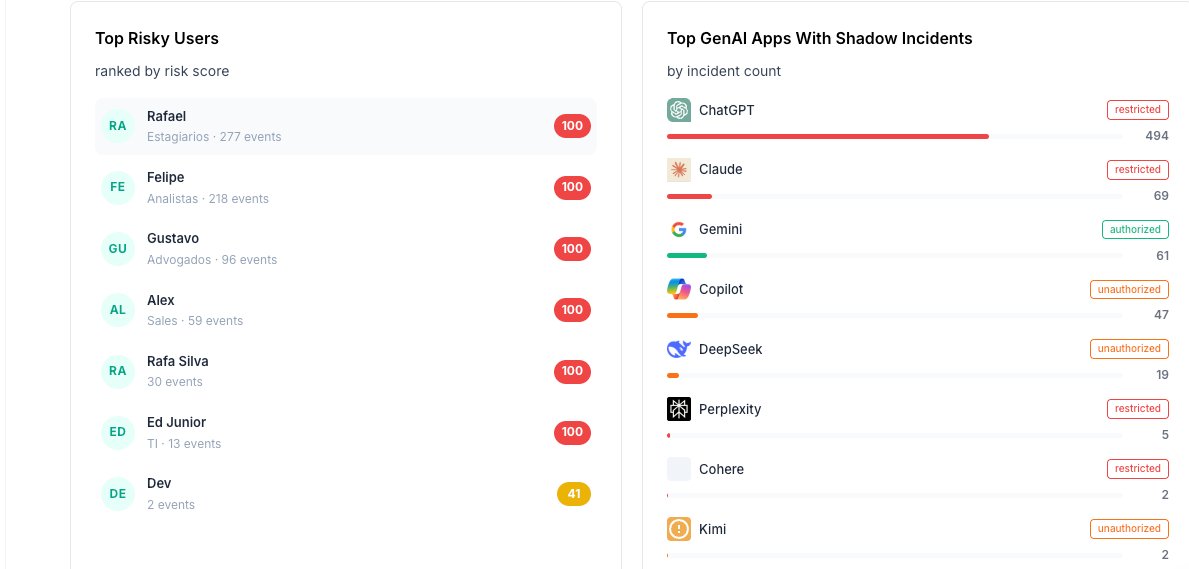
On the right, the app inventory tells you which tools are actually generating incidents and how each one is categorized in your policy. The top of the list shows hundreds of incidents on restricted tools, dozens more on unauthorized ones, and a clean line through the authorized tier. Pieces of that information exist in CASB and discovery consoles too. What tends to be missing in most stacks is a single Shadow AI incident model where app categorization, identity state, and content inspection share one severity tier and one workflow.
On the left, the user view. Seven people sitting at the top of the risk-score distribution, with their team and event count. Estagiários, Analistas, Advogados, Sales, TI. The teams that touch AI most are the teams whose risk needs governing first. Notice the bottom row: one employee with only 2 events but a risk score of 41. Low volume, but the type of incident matters more than the count.
And the identity layer underneath it all:
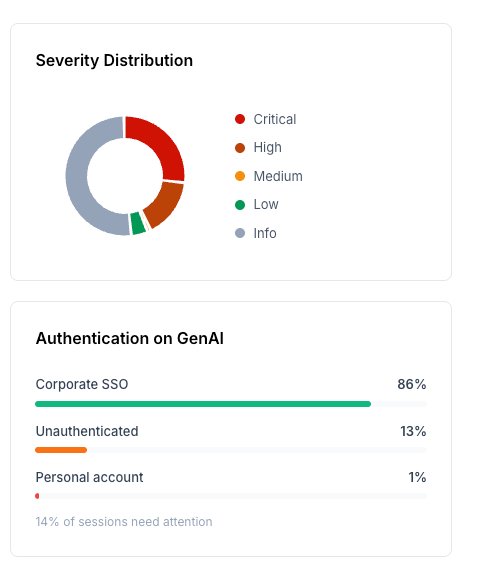
86% of GenAI sessions in this tenant are on corporate SSO. That is the healthy majority. 14% are not, and those 14% are exactly where types 3, 4, 5, and 6 live. Many DLP dashboards still do not surface this slice as a first-class view of GenAI sessions, because the authentication boundary lives in the identity layer rather than in the content-inspection layer.
The policy view
For completeness, here is the Shadow AI policy itself, the way it shows up inside KonaSense. The same taxonomy, with severity mapping, the GenAI coverage tiers, and the human target the policy applies to.
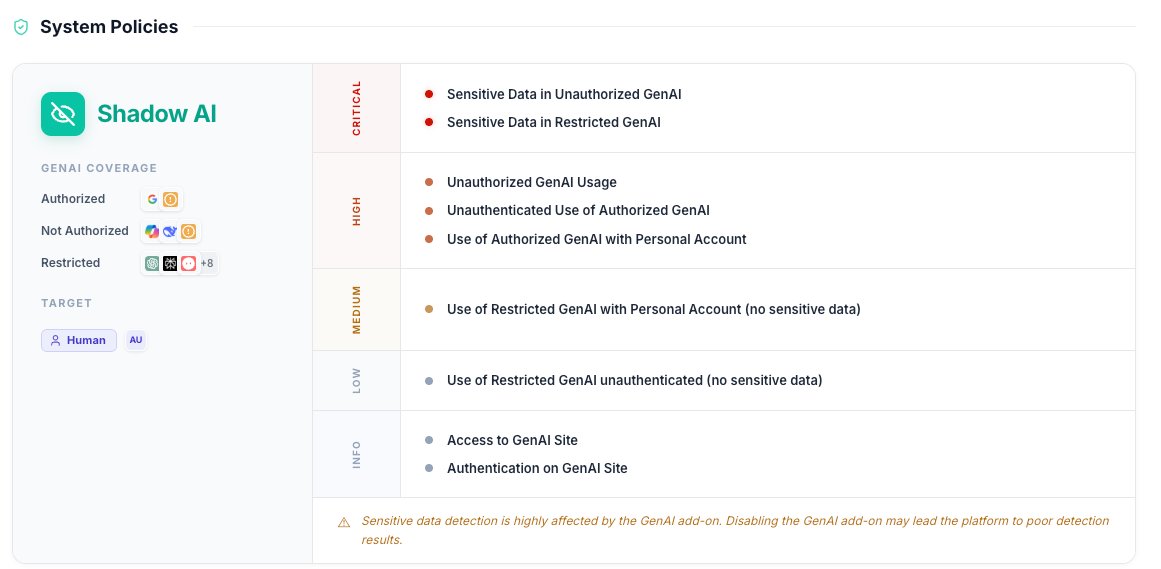
One policy module, seven categories, three coverage tiers, one target audience. The dashboard at the top of this post is what comes out the other side.
What to do with this
Three things, in order.
- Build the inventory before you build the policy. Most teams want to write the policy first. The policy is meaningless if you do not know which tools are in use, by whom, and how. Start with the informational layer: access and authentication telemetry on GenAI domains. Watch it for a month. The right policy practically writes itself.
- Map your existing tools to the truth table. Take your current DLP, CASB, and proxy stack and ask, honestly, which of the three signals each one captures, and whether they roll up into one incident or three separate ones. App context, identity context, data context. Be specific about which tool sees which column.
- Fill the gap with controls that meet AI interactions where they happen. Browser, IDE, CLI, agent runtime, MCP. Some of this can be extended onto existing DLP and CASB investment. Some of it needs a tool designed for the interaction layer from the start. The honest answer for most teams is a mix.
If you want to see all three signals in one view, that is what we built. The dashboard in the screenshots above is the actual KonaSense product. The taxonomy is not a marketing framework. It is the policy engine.
The headline
Shadow AI is not only a leak. It is an interaction. Many of the governance and DLP tools built before the GenAI adoption wave optimized for data leakage, and the strongest ones in the category are now extending into interaction-layer signals. The work for security teams in 2026 is to build the taxonomy first, then decide which parts of it the existing stack already covers, and which parts need something new.